Skip to content
Video

MiniMax-H3-GGUF

локальная генерация видео со стереозвуком

2 min readupdated

Команда Unsloth подготовила GGUF-квантования (сжатые версии весов для запуска на потребительском железе) омнимодальной генеративной системы MiniMaxAI/MiniMax-H3. Модель создаёт видеоролики длительностью до 15 секунд при 24 FPS сразу со встроенной стереодорожкой 32 кГц — звук генерируется совместно с картинкой, а не накладывается поверх. В репозитории собраны обе части пайплайна: шумоподавляющие модели (denoisers) и текстовый энкодер на базе Qwen3-VL. Релиз пригодится тем, кто хочет запускать тяжелую видеогенерацию локально через stablediffusion.cpp или Unsloth, экономя видеопамять без потери ключевых возможностей оригинала.

Ключевые особенности

  • Два режима работы в отдельных файлах: версия fl2va_pruned генерирует ролик по тексту с опорой на ноль, один или два кадра (первый и последний), а ref2va_pruned принимает референсные картинки, видео и аудио.
  • Широкий выбор уровней сжатия: доступны как стандартные кванты от Q2_K (от 6.22 GiB) до Q8_0 (почти 20 GiB), так и динамические сборки UD- со смешанной точностью от Unsloth.
  • Единый энкодер и общие VAE: текстовый энкодер qwen3vl_32b_minimax_h3 (в вариантах Q2_K_M на 12.20 GiB и Q4_K_M на 16.97 GiB) и VAE-модули подходят к обоим чекпоинтам, поэтому для смены режима достаточно докачать только сам denoiser.
  • Оптимизация под ограниченную VRAM: тяжёлый 12-гигабайтный текстовый энкодер можно выгрузить в оперативную память флагом --backend te=cpu, а с параметром --offload-to-cpu модель помещается и на видеокарты меньшего объёма.

Что можно сделать

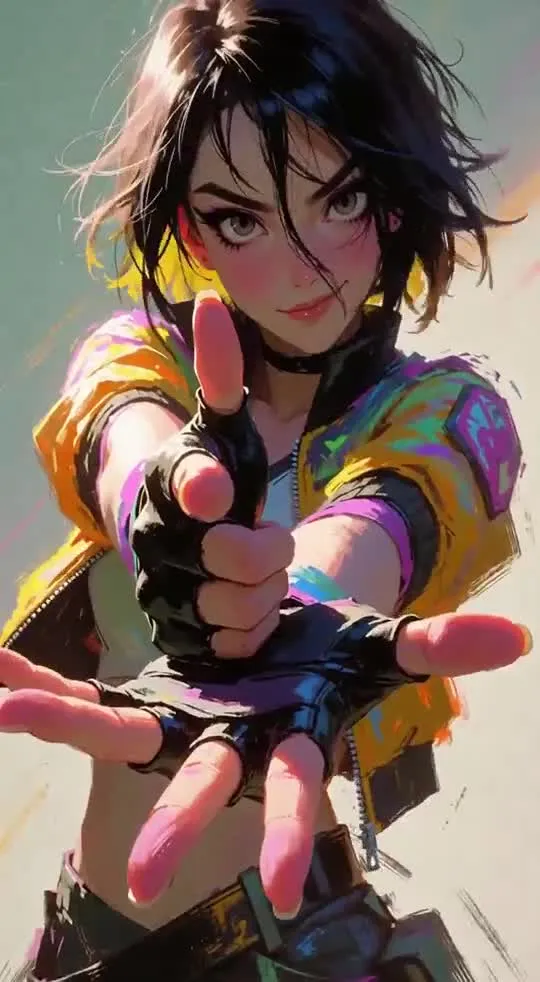
  • Сгенерировать атмосферные клипы со звуком с нуля: использовать fl2va_pruned для создания сцен по текстовому описанию — например, проход красной панды по мшистому бревну в туманном лесу с естественным звуковым сопровождением.
  • Анимировать переход между двумя кадрами: загрузить в fl2va_pruned начальное и конечное изображения, чтобы модель достроила плавное движение и подходящее аудио между ними.
  • Собирать видео по мультимодальным референсам: подать в ref2va_pruned образцы картинок, видеофрагментов и звука, чтобы задать нужный стиль, объекты или акустику сцены.

Пример

sd-cli --mode vid_gen \
  --diffusion-model minimax_h3_fl2va_pruned-UD-Q2_K_XL.gguf \
  --llm qwen3vl_32b_minimax_h3-Q2_K_M.gguf \
  --vae minimax_h3_video_vae_fp16.safetensors \
  --audio-vae minimax_h3_audio_vae_fp32.safetensors \
  --prompt "a red fox trotting through falling snow, cinematic" \
  --width 640 --height 384 --video-frames 25 --steps 4 --cfg-scale 1.0 \
  --backend te=cpu --diffusion-fa --output out.webm
ПодробнееПри запуске обязательны три флага: --mode vid_gen, --cfg-scale 1.0 (модель дистиллирована и падает при значениях выше 1.0) и --backend te=cpu.
Файлы видео- и аудио-VAE в репозиторий не включены — их нужно скачать отдельно из Comfy-Org/MiniMax-H3.
Для самых маленьких квантов рекомендуют связку с энкодером Q2_K_M, для остальных — Q4_K_M. Демо-пример 960x544 (124 кадра, 8 шагов) снят на UD-Q2_K_XL на одной видеокарте.
Лицензия: MiniMax H3 Community License Agreement с территориальными ограничениями.

Видео-примеры
Discuss 443 3.5M

Will it run?

Runs in GGUF Q4_K_M

Full precision does not fit, a quantised version does: quality barely changes down to 8 bits, more noticeably at 4 bits.

  • GGUF Q8_0recommendedweights 40 GB · ready files49 GB
  • GGUF Q6_Kweights 31 GB · ready files38 GB
  • GGUF Q5_0weights 26 GB · ready files33 GB
  • GGUF Q3_Kweights 25 GB · ready files32 GB
  • GGUF Q4_Kweights 21 GB · ready files27 GB
  • GGUF Q2_Kweights 20 GB · ready files26 GB
  • GGUF Q4_K_Mweights 17 GB · ready files23 GB
  • GGUF Q2_K_Mweights 12 GB · ready files17 GB

Tip: go 8-bit.GGUF Q8_0 is within about a percent of full precision in quality, takes half the memory and runs faster on RTX 40/50 and H100. Full precision only pays off for fine-tuning.

What to get for this model

Massed ComputeOpen Massed Compute

Your own GPU: Won't fit any home GPU — renting is cheaper.

Massed Compute hourly prices, November 2026. The discounted price applies with the coupon at checkout.

Estimate: weights plus working memory. Long videos, high resolutions and long contexts need more.

Run it on Massed Compute

A ready script for the machine we advise above: paste it and the model downloads and starts.

  1. 1. Rent A100 80GB

    $1.01 an hour with the coupon. Pick the Ubuntu image when you create the machine.

    Open Massed Compute
  2. 2. Paste the script into the machine's terminal

    Connect over SSH (the Massed Compute panel shows the command) or open a terminal on the machine's desktop.

    HF_TOKEN / CIVITAI_TOKENThe script starts with token lines: paste yours between the quotes. The Hugging Face token is for gated models, the Civitai one for Civitai models.

    #!/usr/bin/env bash
    # MiniMax-H3-GGUF
    set -e
    # NVIDIA driver: CUDA 13 needs 580+. If older or missing, the current nvidia-open is installed (keep yours: KEEP_DRIVER=1)
    DRV=$(nvidia-smi --query-gpu=driver_version --format=csv,noheader 2>/dev/null | head -1 | cut -d. -f1)
    case "$DRV" in ""|*[!0-9]*) DRV=0 ;; esac
    if [ "$DRV" -lt 580 ] && [ -z "${KEEP_DRIVER:-}" ]; then
      . /etc/os-release && \
      curl -fsSLO "https://developer.download.nvidia.com/compute/cuda/repos/ubuntu${VERSION_ID//./}/x86_64/cuda-keyring_1.1-1_all.deb" && \
      sudo dpkg -i cuda-keyring_1.1-1_all.deb && rm -f cuda-keyring_1.1-1_all.deb && \
      sudo apt-get update && \
      sudo DEBIAN_FRONTEND=noninteractive apt-get install -y nvidia-open || \
      { echo "Could not install the NVIDIA driver: see the error above. To keep the current one, run with KEEP_DRIVER=1."; exit 1; }
      echo "NVIDIA driver updated. Reboot the machine (sudo reboot) and run this same script again."
      exit 0
    fi
    curl -LsSf https://astral.sh/uv/install.sh | sh
    source "$HOME/.local/bin/env"
    # CUDA 13+ → int8_convrot (Comfy-Org's advice), else fp8_scaled
    CU=$(nvidia-smi | grep -oP 'CUDA Version: \K[0-9]+' || echo 12)
    [ "$CU" -ge 13 ] && TORCH=cu130 || TORCH=cu128
    [ -d ~/ComfyUI ] || git clone https://github.com/comfyanonymous/ComfyUI ~/ComfyUI
    cd ~/ComfyUI
    uv venv --python 3.12 --allow-existing && source .venv/bin/activate
    uv pip install torch torchvision torchaudio --index-url https://download.pytorch.org/whl/$TORCH
    uv pip install -r requirements.txt "huggingface_hub[cli]"
    # Base files: MiniMax H3, 8-bit
    if [ "$CU" -ge 13 ]; then
      hf download Comfy-Org/MiniMax-H3 text_encoders/qwen3vl_32b_minimax_h3_int8_convrot.safetensors vae/minimax_h3_video_vae_fp16.safetensors vae/minimax_h3_audio_vae_fp32.safetensors --local-dir models
    else
      hf download Comfy-Org/MiniMax-H3 text_encoders/qwen3vl_32b_minimax_h3_nvfp4_awq.safetensors vae/minimax_h3_video_vae_fp16.safetensors vae/minimax_h3_audio_vae_fp32.safetensors --local-dir models
    fi
    # Main model: MiniMax-H3-GGUF
    [ -d custom_nodes/ComfyUI-GGUF ] || git clone https://github.com/city96/ComfyUI-GGUF custom_nodes/ComfyUI-GGUF
    uv pip install -r custom_nodes/ComfyUI-GGUF/requirements.txt
    hf download unsloth/MiniMax-H3-GGUF --include '*Q8_0*.gguf' --local-dir models/unet
    # Start ComfyUI. From your computer: ssh -L 8188:localhost:8188 user@IP, then http://localhost:8188
    python main.py --listen 127.0.0.1 --port 8188
    Add more LoRAs to MiniMax-H3-GGUF
  3. 3. Use it

    From your computer: ssh -L 8188:localhost:8188 user@machine-IP, then open http://localhost:8188. Or open that address in the browser on the machine's desktop. The model's workflow is usually in its Hugging Face card.

Stop the machine in the panel when you are done: it bills by the minute while it runs.

How to speed it up

Picked for this model type. Choose your hardware above to see what fits you exactly.

  • SageAttention 3v2.2.0from October 28, 2025

    even faster on RTX 50 / Blackwell

    FP4 attention for Blackwell. Faster than SageAttention 2, but the authors suggest v2 when accuracy matters.

    How to enable: Build from the sageattention3_blackwell folder of the repo; in ComfyUI via KJNodes.

    Earlier generations (2)
    • SageAttention 2++ — Quantised (INT8/FP8) attention with no visible quality loss. The main speed-up for image and video generation.
    • SageAttention 1 — First version: INT8 for Q·K. Still works, but 2++ is faster and more accurate.
  • FlashAttention 44.0.0b40from November 18, 2026new release

    fastest exact attention on B200

    Kernels for Blackwell (beta). Exact attention without quantisation — fine for everything, LLMs included.

    How to enable: pip install flash-attn-4; vLLM and SGLang pick it up themselves.

    Earlier generations (3)
    • FlashAttention 3 — The Hopper (H100/H200) version with FP8.
    • FlashAttention 2 — The standard for RTX 30/40/50 and A100: exact attention without the memory cost of long contexts.
    • xFormers — The older way to speed up attention, works almost everywhere. Sage or Flash are faster where available.
  • cache-dit (DBCache)v1.5.6from November 20, 2026new release

    1.5–3× at nearly the same quality

    Reuses block outputs between diffusion steps. Supports most DiT models.

    How to enable: pip install cache-dit; one line cache_dit.enable_cache(pipe) for diffusers.

    Earlier generations (2)
    • MagCache — Skips steps by magnitude of change. More accurate than TeaCache, no calibration.
    • TeaCache — The first popular diffusion step cache. Works, newer methods are more accurate.
  • LightX2V step distill0.6.1from November 9, 2026new release

    5–10× fewer steps

    Distilled LoRAs and an engine: video in 4–8 steps instead of 30–50.

    How to enable: Load their step-distill LoRA, CFG 1.0, 4–8 steps.

  • torch.compile2.15.0from October 28, 2026new release

    10–30% for free

    Compiles the model for your GPU. Slower first run, faster afterwards.

    How to enable: model = torch.compile(model); in ComfyUI the TorchCompileModel node.

MiniMax H3 prompts

All prompts

Ready prompts with the resulting video: copy and try.

Model family

New posts about versions of MiniMax-H3 (quants, finetunes, LoRAs) will show up under the bell.

Quantised versions 12All on Hugging Face
Fine-tunes 12All on Hugging Face
LoRAs and adapters 12All on Hugging Face
Merges 3All on Hugging Face

About the model

unsloth/MiniMax-H3-GGUF
Author
unsloth
Category
Video
Released
Posted

On NeyroLearn

Hugging Face

3.5M443

Ask AI about this model

Answered by Gemini 4 · the chat is kept only in this tab

Comments