Skip to content
Video

H3 Fight Flow

непрерывные боевые сцены без сброса поз

2 min read

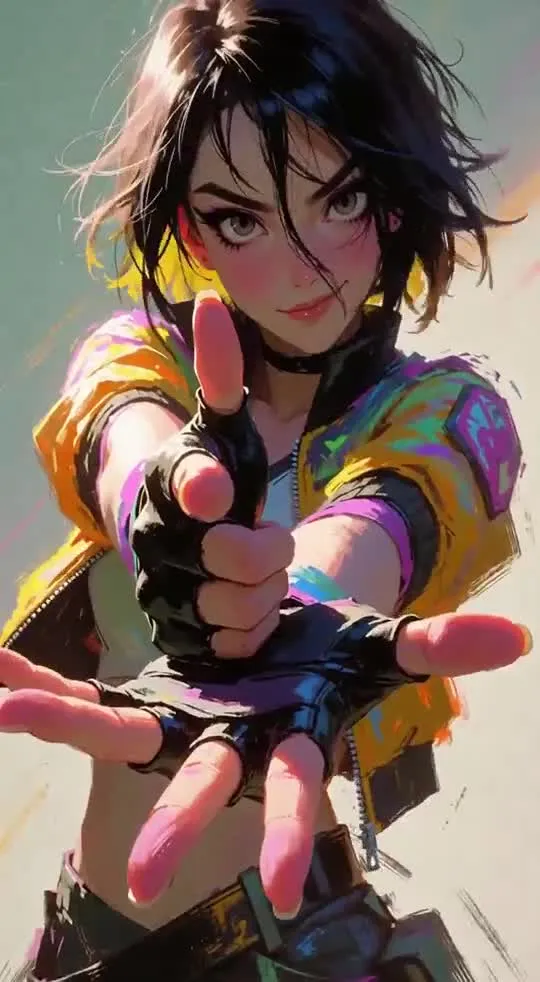
Концепт-LoRA (небольшая надстройка над базовой моделью) для видеогенератора MiniMax H3 от автора FourBunny. Обычные модели в экшен-сценах часто заставляют персонажей махать кулаками независимо друг от друга и возвращаться в нейтральную стойку после каждого удара. Эта LoRA выстраивает причинно-следственную связь: атака, реакция, контакт, смена инициативы и переход в следующее движение из текущей позиции. Подойдёт тем, кто генерирует боевые сцены в стиле рукопашного боя, фехтования или ган-фу.

Ключевые особенности

  • Связность движений: предыдущее действие задаёт положение тела, баланс и дистанцию для следующего удара вместо сброса в исходную позу.
  • Групповые схватки: в боях с несколькими противниками один враг выходит из обмена ударами, а следующий естественно вступает в бой.
  • Три режима взаимодействия: отдельные триггер-фразы под рукопашный бой, холодное оружие и ближний бой с огнестрелом (gun-fu).
  • Обновление V2: значительно уменьшено искажение оружия (эффект «лапши»), а также размытие и деформация персонажей.

Что можно сделать

  • Поставить рукопашную схватку: использовать триггер Unarmed combat interaction. для сцен с ударами, захватами и бросками, где важен контроль дистанции.
  • Сгенерировать дуэль на мечах или копьях: задать Melee weapon interaction., чтобы модель корректно обрабатывала парирование и траектории клинков.
  • Снять экшен в духе ган-фу: применить Gun-fu interaction. для перестрелок на близкой дистанции с перехватом оружия.
  • Скомбинировать с другими адаптерами: использовать Fight Flow как связующий слой поверх узких Combat-, Weapon- или Motion Repair-LoRA, которые отвечают за конкретные приёмы.

Пример

В промпте выберите триггер в зависимости от главной логики боя, а не просто наличия оружия в кадре:
— для кулачного боя и борьбы: Unarmed combat interaction.
— для клинков, шестов и копий: Melee weapon interaction.
— для ближнего боя с пистолетами: Gun-fu interaction.
По словам автора, модель способна выстроить связную боевую сцену даже по короткому промпту с одним из этих триггеров.

ПодробнееРекомендуемый вес (strength): не выше 0.6 для версии V2; в двухпроходной генерации автор тестировал 0.65 на первом проходе и 0.25 на втором.
Обучение: метод D-OPSD (Teacher напрямую обращается к целевому видео, а не только к текстовым описаниям) на видеокарте RTX 6000D.
Затраты ресурсов при обучении: пиковое потребление до ~60 ГБ VRAM, время обучения в 2–3 раза дольше обычных LoRA автора.
Ограничение: это не LoRA для ускорения движений — она отвечает именно за логику и передачу состояния между действиями.

Видео-примеры
Discuss 124 2K

Will it run?

Runs in 4-bit

Full precision does not fit, a quantised version does: quality barely changes down to 8 bits, more noticeably at 4 bits.

  • BF16weights 62 GB · ready files74 GB
  • FP8 / INT8recommendedweights 31 GB39 GB
  • 4-bitweights 17 GB23 GB

Tip: go 8-bit.FP8 / INT8 is within about a percent of full precision in quality, takes half the memory and runs faster on RTX 40/50 and H100. Full precision only pays off for fine-tuning.

This is a LoRA: counted together with its base model MiniMax-H3.

Estimate: weights plus working memory. Long videos, high resolutions and long contexts need more.

Run it on Massed Compute

A ready script for the machine we advise above: paste it and the model downloads and starts.

  1. 1. Rent RTX A6000

    $0.43 an hour with the coupon. Pick the Ubuntu image when you create the machine.

    Open Massed Compute
  2. 2. Paste the script into the machine's terminal

    Connect over SSH (the Massed Compute panel shows the command) or open a terminal on the machine's desktop.

    HF_TOKEN / CIVITAI_TOKENThe script starts with token lines: paste yours between the quotes. The Hugging Face token is for gated models, the Civitai one for Civitai models.

    #!/usr/bin/env bash
    # 2989579-h3-fight-flow-continuous-fight-interacti
    set -e
    # ===== Tokens: paste yours between the quotes =====
    export CIVITAI_TOKEN=""   # civitai.com/user/account → API Keys, for Civitai LoRAs
    # ==========================================
    # NVIDIA driver: CUDA 13 needs 580+. If older or missing, the current nvidia-open is installed (keep yours: KEEP_DRIVER=1)
    DRV=$(nvidia-smi --query-gpu=driver_version --format=csv,noheader 2>/dev/null | head -1 | cut -d. -f1)
    case "$DRV" in ""|*[!0-9]*) DRV=0 ;; esac
    if [ "$DRV" -lt 580 ] && [ -z "${KEEP_DRIVER:-}" ]; then
      . /etc/os-release && \
      curl -fsSLO "https://developer.download.nvidia.com/compute/cuda/repos/ubuntu${VERSION_ID//./}/x86_64/cuda-keyring_1.1-1_all.deb" && \
      sudo dpkg -i cuda-keyring_1.1-1_all.deb && rm -f cuda-keyring_1.1-1_all.deb && \
      sudo apt-get update && \
      sudo DEBIAN_FRONTEND=noninteractive apt-get install -y nvidia-open || \
      { echo "Could not install the NVIDIA driver: see the error above. To keep the current one, run with KEEP_DRIVER=1."; exit 1; }
      echo "NVIDIA driver updated. Reboot the machine (sudo reboot) and run this same script again."
      exit 0
    fi
    curl -LsSf https://astral.sh/uv/install.sh | sh
    source "$HOME/.local/bin/env"
    # CUDA 13+ → int8_convrot (Comfy-Org's advice), else fp8_scaled
    CU=$(nvidia-smi | grep -oP 'CUDA Version: \K[0-9]+' || echo 12)
    [ "$CU" -ge 13 ] && TORCH=cu130 || TORCH=cu128
    [ -d ~/ComfyUI ] || git clone https://github.com/comfyanonymous/ComfyUI ~/ComfyUI
    cd ~/ComfyUI
    uv venv --python 3.12 --allow-existing && source .venv/bin/activate
    uv pip install torch torchvision torchaudio --index-url https://download.pytorch.org/whl/$TORCH
    uv pip install -r requirements.txt "huggingface_hub[cli]"
    civitai() {  # civitai <model id> <folder>: the newest version of a Civitai model
      vid=$(curl -fsSL "https://civitai.com/api/v1/models/$1" | python3 -c 'import json,sys;print(json.load(sys.stdin)["modelVersions"][0]["id"])')
      (cd "$2" && curl -fL -OJ -H "Authorization: Bearer $CIVITAI_TOKEN" "https://civitai.com/api/download/models/$vid")
    }
    # Base files: MiniMax H3, 8-bit
    if [ "$CU" -ge 13 ]; then
      hf download Comfy-Org/MiniMax-H3 diffusion_models/minimax_h3_fl2va_int8_convrot.safetensors text_encoders/qwen3vl_32b_minimax_h3_int8_convrot.safetensors vae/minimax_h3_video_vae_fp16.safetensors vae/minimax_h3_audio_vae_fp32.safetensors --local-dir models
    else
      hf download Comfy-Org/MiniMax-H3 diffusion_models/minimax_h3_fl2va_pruned_fp8_scaled.safetensors text_encoders/qwen3vl_32b_minimax_h3_nvfp4_awq.safetensors vae/minimax_h3_video_vae_fp16.safetensors vae/minimax_h3_audio_vae_fp32.safetensors --local-dir models
    fi
    # LoRAs (1)
    civitai 2989579 models/loras
    # Start ComfyUI. From your computer: ssh -L 8188:localhost:8188 user@IP, then http://localhost:8188
    python main.py --listen 127.0.0.1 --port 8188
    Add more LoRAs to MiniMax-H3
  3. 3. Use it

    From your computer: ssh -L 8188:localhost:8188 user@machine-IP, then open http://localhost:8188. Or open that address in the browser on the machine's desktop. The model's workflow is usually in its Hugging Face card.

Stop the machine in the panel when you are done: it bills by the minute while it runs.

How to speed it up

Picked for this model type. Choose your hardware above to see what fits you exactly.

  • SageAttention 3v2.2.0from October 28, 2025

    even faster on RTX 50 / Blackwell

    FP4 attention for Blackwell. Faster than SageAttention 2, but the authors suggest v2 when accuracy matters.

    How to enable: Build from the sageattention3_blackwell folder of the repo; in ComfyUI via KJNodes.

    Earlier generations (2)
    • SageAttention 2++ — Quantised (INT8/FP8) attention with no visible quality loss. The main speed-up for image and video generation.
    • SageAttention 1 — First version: INT8 for Q·K. Still works, but 2++ is faster and more accurate.
  • FlashAttention 44.0.0b40from November 18, 2026new release

    fastest exact attention on B200

    Kernels for Blackwell (beta). Exact attention without quantisation — fine for everything, LLMs included.

    How to enable: pip install flash-attn-4; vLLM and SGLang pick it up themselves.

    Earlier generations (3)
    • FlashAttention 3 — The Hopper (H100/H200) version with FP8.
    • FlashAttention 2 — The standard for RTX 30/40/50 and A100: exact attention without the memory cost of long contexts.
    • xFormers — The older way to speed up attention, works almost everywhere. Sage or Flash are faster where available.
  • cache-dit (DBCache)v1.5.6from November 20, 2026new release

    1.5–3× at nearly the same quality

    Reuses block outputs between diffusion steps. Supports most DiT models.

    How to enable: pip install cache-dit; one line cache_dit.enable_cache(pipe) for diffusers.

    Earlier generations (2)
    • MagCache — Skips steps by magnitude of change. More accurate than TeaCache, no calibration.
    • TeaCache — The first popular diffusion step cache. Works, newer methods are more accurate.
  • LightX2V step distill0.6.1from November 9, 2026new release

    5–10× fewer steps

    Distilled LoRAs and an engine: video in 4–8 steps instead of 30–50.

    How to enable: Load their step-distill LoRA, CFG 1.0, 4–8 steps.

  • torch.compile2.15.0from October 28, 2026new release

    10–30% for free

    Compiles the model for your GPU. Slower first run, faster afterwards.

    How to enable: model = torch.compile(model); in ComfyUI the TorchCompileModel node.

MiniMax H3 prompts

All prompts

Ready prompts with the resulting video: copy and try.

Model family

Requires the base model

MiniMaxAI/MiniMax-H3

This model is a LoRA / adapter. Download the base model first, then load this one on top.

New posts about versions of MiniMax-H3 (quants, finetunes, LoRAs) will show up under the bell.

Quantised versions 12All on Hugging Face
Fine-tunes 12All on Hugging Face
LoRAs and adapters 12All on Hugging Face
Merges 3All on Hugging Face

About the model

civitai/2989579-h3-fight-flow-continuous-fight-interacti
Author
FourBunny
Category
Video
Released
Posted

On NeyroLearn

Civitai

2K124

Ask AI about this model

Answered by Gemini 4 · the chat is kept only in this tab

Comments