Skip to content
Video

MiniMax H3 Dance LoRA

An adapter for quality dance generation

2 min read

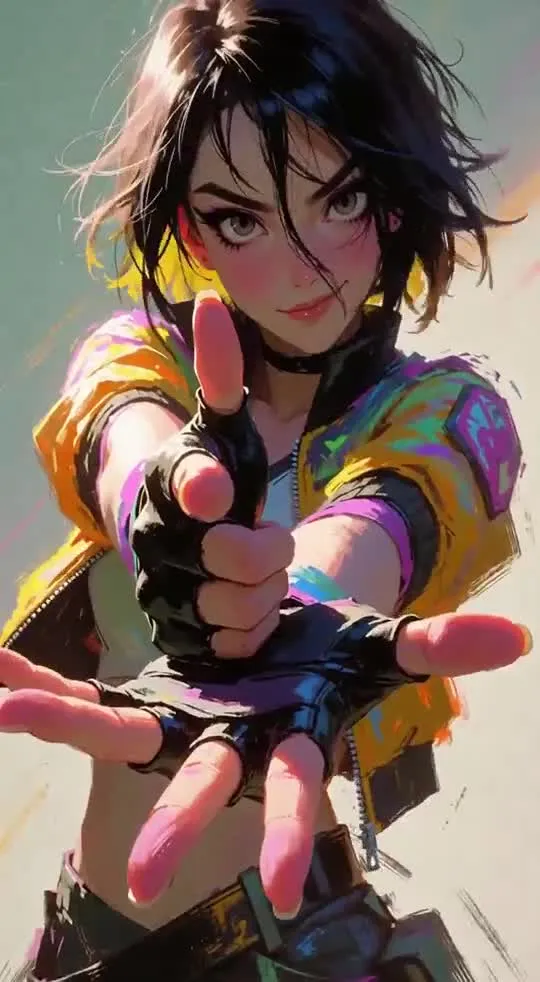
This LoRA (a small add-on over the base model) is created for the MiniMax H3 video generator and is designed for professional handling of dance choreography — from TikTok trends and K-Pop to street styles and anime dances (ACG). The model solves the main problem of the base model: it removes chaotic hand movement and sluggish swaying, replacing them with structured whole-body movements. The adapter improves torso and hip isolation, handles complex choreography, fixes fingers during fast gestures, and adds realistic physics for hair and clothing. It is suitable for videographers, social media content creators, and video generation hobbyists.

Key features

  • Elimination of the "jellyfish effect" and aimless swaying of the upper body
  • Clear hand detail and prevention of "monolithic" palms during fast movements
  • Realistic body physics: torso and hip isolation, step processing, clothing, and hair
  • High compatibility thanks to a non-destructive training approach without forced integration of alien concepts

What you can do

  • Create a dynamic clip with a solo dance or pair/group choreography in K-Pop or hip-hop style
  • Generate high-quality dance videos for TikTok and Reels without hand and finger deformations
  • Combine the adapter with auxiliary tools (for example, utilities for precise beat matching)
Read moreDetails
Recommended weight: 0.7 – 1.0 (0.7–0.85 for group dances, 0.85–1.0 for solos).
Limitations: does not teach the model fundamentally new styles it does not know.
Requirements: due to the randomness of the base model, complex routines may require multiple generations (attempts).
Author: FourBunny.

Video examples
Discuss 94 1.3K

Will it run?

Runs in 4-bit

Full precision does not fit, a quantised version does: quality barely changes down to 8 bits, more noticeably at 4 bits.

  • BF16weights 62 GB · ready files74 GB
  • FP8 / INT8recommendedweights 31 GB39 GB
  • 4-bitweights 17 GB23 GB

Tip: go 8-bit.FP8 / INT8 is within about a percent of full precision in quality, takes half the memory and runs faster on RTX 40/50 and H100. Full precision only pays off for fine-tuning.

This is a LoRA: counted together with its base model MiniMax-H3.

Estimate: weights plus working memory. Long videos, high resolutions and long contexts need more.

Run it on Massed Compute

A ready script for the machine we advise above: paste it and the model downloads and starts.

  1. 1. Rent RTX A6000

    $0.43 an hour with the coupon. Pick the Ubuntu image when you create the machine.

    Open Massed Compute
  2. 2. Paste the script into the machine's terminal

    Connect over SSH (the Massed Compute panel shows the command) or open a terminal on the machine's desktop.

    HF_TOKEN / CIVITAI_TOKENThe script starts with token lines: paste yours between the quotes. The Hugging Face token is for gated models, the Civitai one for Civitai models.

    #!/usr/bin/env bash
    # 3056222-minimax-h3-dance-lora
    set -e
    # ===== Tokens: paste yours between the quotes =====
    export CIVITAI_TOKEN=""   # civitai.com/user/account → API Keys, for Civitai LoRAs
    # ==========================================
    # NVIDIA driver: CUDA 13 needs 580+. If older or missing, the current nvidia-open is installed (keep yours: KEEP_DRIVER=1)
    DRV=$(nvidia-smi --query-gpu=driver_version --format=csv,noheader 2>/dev/null | head -1 | cut -d. -f1)
    case "$DRV" in ""|*[!0-9]*) DRV=0 ;; esac
    if [ "$DRV" -lt 580 ] && [ -z "${KEEP_DRIVER:-}" ]; then
      . /etc/os-release && \
      curl -fsSLO "https://developer.download.nvidia.com/compute/cuda/repos/ubuntu${VERSION_ID//./}/x86_64/cuda-keyring_1.1-1_all.deb" && \
      sudo dpkg -i cuda-keyring_1.1-1_all.deb && rm -f cuda-keyring_1.1-1_all.deb && \
      sudo apt-get update && \
      sudo DEBIAN_FRONTEND=noninteractive apt-get install -y nvidia-open || \
      { echo "Could not install the NVIDIA driver: see the error above. To keep the current one, run with KEEP_DRIVER=1."; exit 1; }
      echo "NVIDIA driver updated. Reboot the machine (sudo reboot) and run this same script again."
      exit 0
    fi
    curl -LsSf https://astral.sh/uv/install.sh | sh
    source "$HOME/.local/bin/env"
    # CUDA 13+ → int8_convrot (Comfy-Org's advice), else fp8_scaled
    CU=$(nvidia-smi | grep -oP 'CUDA Version: \K[0-9]+' || echo 12)
    [ "$CU" -ge 13 ] && TORCH=cu130 || TORCH=cu128
    [ -d ~/ComfyUI ] || git clone https://github.com/comfyanonymous/ComfyUI ~/ComfyUI
    cd ~/ComfyUI
    uv venv --python 3.12 --allow-existing && source .venv/bin/activate
    uv pip install torch torchvision torchaudio --index-url https://download.pytorch.org/whl/$TORCH
    uv pip install -r requirements.txt "huggingface_hub[cli]"
    civitai() {  # civitai <model id> <folder>: the newest version of a Civitai model
      vid=$(curl -fsSL "https://civitai.com/api/v1/models/$1" | python3 -c 'import json,sys;print(json.load(sys.stdin)["modelVersions"][0]["id"])')
      (cd "$2" && curl -fL -OJ -H "Authorization: Bearer $CIVITAI_TOKEN" "https://civitai.com/api/download/models/$vid")
    }
    # Base files: MiniMax H3, 8-bit
    if [ "$CU" -ge 13 ]; then
      hf download Comfy-Org/MiniMax-H3 diffusion_models/minimax_h3_fl2va_int8_convrot.safetensors text_encoders/qwen3vl_32b_minimax_h3_int8_convrot.safetensors vae/minimax_h3_video_vae_fp16.safetensors vae/minimax_h3_audio_vae_fp32.safetensors --local-dir models
    else
      hf download Comfy-Org/MiniMax-H3 diffusion_models/minimax_h3_fl2va_pruned_fp8_scaled.safetensors text_encoders/qwen3vl_32b_minimax_h3_nvfp4_awq.safetensors vae/minimax_h3_video_vae_fp16.safetensors vae/minimax_h3_audio_vae_fp32.safetensors --local-dir models
    fi
    # LoRAs (1)
    civitai 3056222 models/loras
    # Start ComfyUI. From your computer: ssh -L 8188:localhost:8188 user@IP, then http://localhost:8188
    python main.py --listen 127.0.0.1 --port 8188
    Add more LoRAs to MiniMax-H3
  3. 3. Use it

    From your computer: ssh -L 8188:localhost:8188 user@machine-IP, then open http://localhost:8188. Or open that address in the browser on the machine's desktop. The model's workflow is usually in its Hugging Face card.

Stop the machine in the panel when you are done: it bills by the minute while it runs.

How to speed it up

Picked for this model type. Choose your hardware above to see what fits you exactly.

  • SageAttention 3v2.2.0from October 28, 2025

    even faster on RTX 50 / Blackwell

    FP4 attention for Blackwell. Faster than SageAttention 2, but the authors suggest v2 when accuracy matters.

    How to enable: Build from the sageattention3_blackwell folder of the repo; in ComfyUI via KJNodes.

    Earlier generations (2)
    • SageAttention 2++ — Quantised (INT8/FP8) attention with no visible quality loss. The main speed-up for image and video generation.
    • SageAttention 1 — First version: INT8 for Q·K. Still works, but 2++ is faster and more accurate.
  • FlashAttention 44.0.0b40from November 18, 2026new release

    fastest exact attention on B200

    Kernels for Blackwell (beta). Exact attention without quantisation — fine for everything, LLMs included.

    How to enable: pip install flash-attn-4; vLLM and SGLang pick it up themselves.

    Earlier generations (3)
    • FlashAttention 3 — The Hopper (H100/H200) version with FP8.
    • FlashAttention 2 — The standard for RTX 30/40/50 and A100: exact attention without the memory cost of long contexts.
    • xFormers — The older way to speed up attention, works almost everywhere. Sage or Flash are faster where available.
  • cache-dit (DBCache)v1.5.6from November 20, 2026new release

    1.5–3× at nearly the same quality

    Reuses block outputs between diffusion steps. Supports most DiT models.

    How to enable: pip install cache-dit; one line cache_dit.enable_cache(pipe) for diffusers.

    Earlier generations (2)
    • MagCache — Skips steps by magnitude of change. More accurate than TeaCache, no calibration.
    • TeaCache — The first popular diffusion step cache. Works, newer methods are more accurate.
  • LightX2V step distill0.6.1from November 9, 2026new release

    5–10× fewer steps

    Distilled LoRAs and an engine: video in 4–8 steps instead of 30–50.

    How to enable: Load their step-distill LoRA, CFG 1.0, 4–8 steps.

  • torch.compile2.15.0from October 28, 2026new release

    10–30% for free

    Compiles the model for your GPU. Slower first run, faster afterwards.

    How to enable: model = torch.compile(model); in ComfyUI the TorchCompileModel node.

MiniMax H3 prompts

All prompts

Ready prompts with the resulting video: copy and try.

Model family

Requires the base model

MiniMaxAI/MiniMax-H3

This model is a LoRA / adapter. Download the base model first, then load this one on top.

New posts about versions of MiniMax-H3 (quants, finetunes, LoRAs) will show up under the bell.

Quantised versions 12All on Hugging Face
Fine-tunes 12All on Hugging Face
LoRAs and adapters 12All on Hugging Face
Merges 3All on Hugging Face

About the model

civitai/3056222-minimax-h3-dance-lora
Author
FourBunny
Category
Video
Released
Posted

On NeyroLearn

Civitai

1.3K94

Ask AI about this model

Answered by Gemini 4 · the chat is kept only in this tab

Comments