Skip to content
Robotics

LoongForge-GR00T-N1.7-LIBERO

VLA-политика для четырёх наборов LIBERO

2 min readupdated

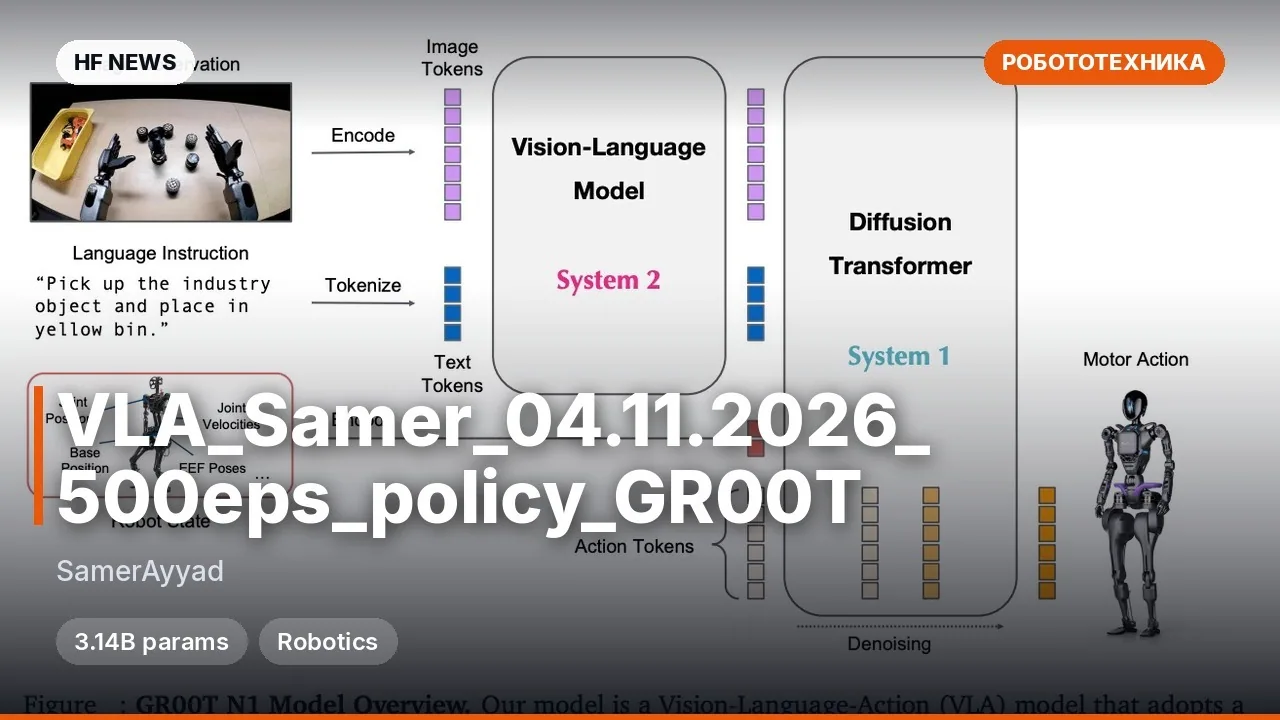
LoongForge-GR00T-N1.7-LIBERO — это четыре SFT-чекпоинта для vision-language-action (VLA) модели GR00T-N1.7, по одному на наборы LIBERO: spatial, object, goal и 10. Каждый чекпоинт — дообучение nvidia/GR00T-N1.7-3B: бэкбон Qwen3-VL / Cosmos-Reason2-2B обрабатывает инструкцию, изображения с внешней и кистевой камер и состояние робота, а flow-matching diffusion transformer (DiT) предсказывает будущие действия. На выходе — 7-мерные дельта-команды энд-эффектора блоками по 16 шагов; при оценке выполняется 8 шагов, затем перепланирование. Обучение воспроизводит официальный рецепт NVIDIA Isaac-GR00T, но выполнено в LoongForge; пригодится для запуска LIBERO и работы с готовыми политиками.

Ключевые особенности

  • Четыре независимых чекпоинта под libero_spatial, libero_object, libero_goal и libero_10.
  • На входе: текстовая инструкция, внешняя и wrist-камера, 8-мерное состояние робота.
  • 7D delta end-effector команды в OSC_POSE, чанки по 16 шагов, выполнение по 8 шагов.
  • Чекпоинты в FP32, ~12.5 ГБ каждый; 3,455,180,928 параметров.
  • Обучение в LoongForge по рецепту NVIDIA: 20 000 итераций, batch 640, bf16.

Что можно сделать

  • Запустить оценку одного из наборов LIBERO через конфиги LoongForge.
  • Подставить путь к нужному suite-каталогу в libero_<suite>.yaml.
  • Сравнить поведение с официальными чекпоинтами nvidia/GR00T-N1.7-LIBERO.
  • Прогнать политику в симуляторе LIBERO на 10 задачах каждого suite.

Пример

benchmark:
  suite: libero_spatial
  max_steps: 720
model:
  backend: loongforge
  model_type: Gr00tN1d7
server:
  ckpt_path: /path/to/libero_spatial
Подробнее4 чекпоинта: libero_spatial, libero_object, libero_goal, libero_10; каждый — отдельный SFT.
FP32, 3,455,180,928 параметров, ~12.5 ГБ на чекпоинт.
Обучение: 20 000 итераций, глобальный batch 640 (80×8 GPU), bf16, seed 42.
Политика выдаёт 16 шагов, при оценке выполняется 8 до перепланирования.
Данные: LeRobot v2.1, 20 fps, robot_type=franka; чисел успеха на LIBERO в карточке нет.

Discuss Telegram 0

Will it run?

Runs in BF16

Fits without quantisation.

  • BF16weights 12 GB · ready files13 GB
  • FP8 / INT8recommendedweights 5.9 GB6.9 GB
  • 4-bitweights 3.3 GB4.1 GB

Tip: go 8-bit.FP8 / INT8 is within about a percent of full precision in quality, takes half the memory and runs faster on RTX 40/50 and H100. Full precision only pays off for fine-tuning.

What to get for this model

Massed ComputeOpen Massed Compute

Your own GPU: FP8 / INT8 — from RTX 5060 Ti 8GB · BF16 — from RTX 5080

Massed Compute hourly prices, November 2026. The discounted price applies with the coupon at checkout.

Estimate: weights plus working memory. Long videos, high resolutions and long contexts need more.

Run it on Massed Compute

The script downloads the model to the rented machine. How to run it is in the model card.

  1. 1. Rent a machine with a fitting GPU

    Open Massed Compute
  2. 2. Paste the script into the machine's terminal

    Connect over SSH (the Massed Compute panel shows the command) or open a terminal on the machine's desktop.

    HF_TOKEN / CIVITAI_TOKENThe script starts with token lines: paste yours between the quotes. The Hugging Face token is for gated models, the Civitai one for Civitai models.

    # LoongForge/LoongForge-GR00T-N1.7-LIBERO
    mkdir -p ~/models
    curl -LsSf https://astral.sh/uv/install.sh | sh
    source "$HOME/.local/bin/env"
    uv tool install "huggingface_hub[cli]"
    hf download LoongForge/LoongForge-GR00T-N1.7-LIBERO --local-dir ~/models/LoongForge-GR00T-N1.7-LIBERO
    # The model is in ~/models. How to run it is in the model card (link above).
  3. 3. Use it

    The model is in ~/models. How to run it is in the model card (link above).

Stop the machine in the panel when you are done: it bills by the minute while it runs.

How to speed it up

Picked for this model type. Choose your hardware above to see what fits you exactly.

  • FlashAttention 44.0.0b40from November 18, 2026new release

    fastest exact attention on B200

    Kernels for Blackwell (beta). Exact attention without quantisation — fine for everything, LLMs included.

    How to enable: pip install flash-attn-4; vLLM and SGLang pick it up themselves.

    Earlier generations (2)
    • FlashAttention 3 — The Hopper (H100/H200) version with FP8.
    • FlashAttention 2 — The standard for RTX 30/40/50 and A100: exact attention without the memory cost of long contexts.
  • torch.compile2.15.0from October 28, 2026new release

    10–30% for free

    Compiles the model for your GPU. Slower first run, faster afterwards.

    How to enable: model = torch.compile(model); in ComfyUI the TorchCompileModel node.

Model family

New posts about versions of GR00T-N1.7-3B (quants, finetunes, LoRAs) will show up under the bell.

Quantised versions 3All on Hugging Face
Fine-tunes 12All on Hugging Face
LoRAs and adapters 1All on Hugging Face

About the model

LoongForge/LoongForge-GR00T-N1.7-LIBERO
Author
LoongForge
Category
Robotics
Released
Posted

On NeyroLearn

Hugging Face

00

Ask AI about this model

Answered by Gemini 4 · the chat is kept only in this tab

Comments