Skip to content
Robotics

track_v4_no-cones_dual-image

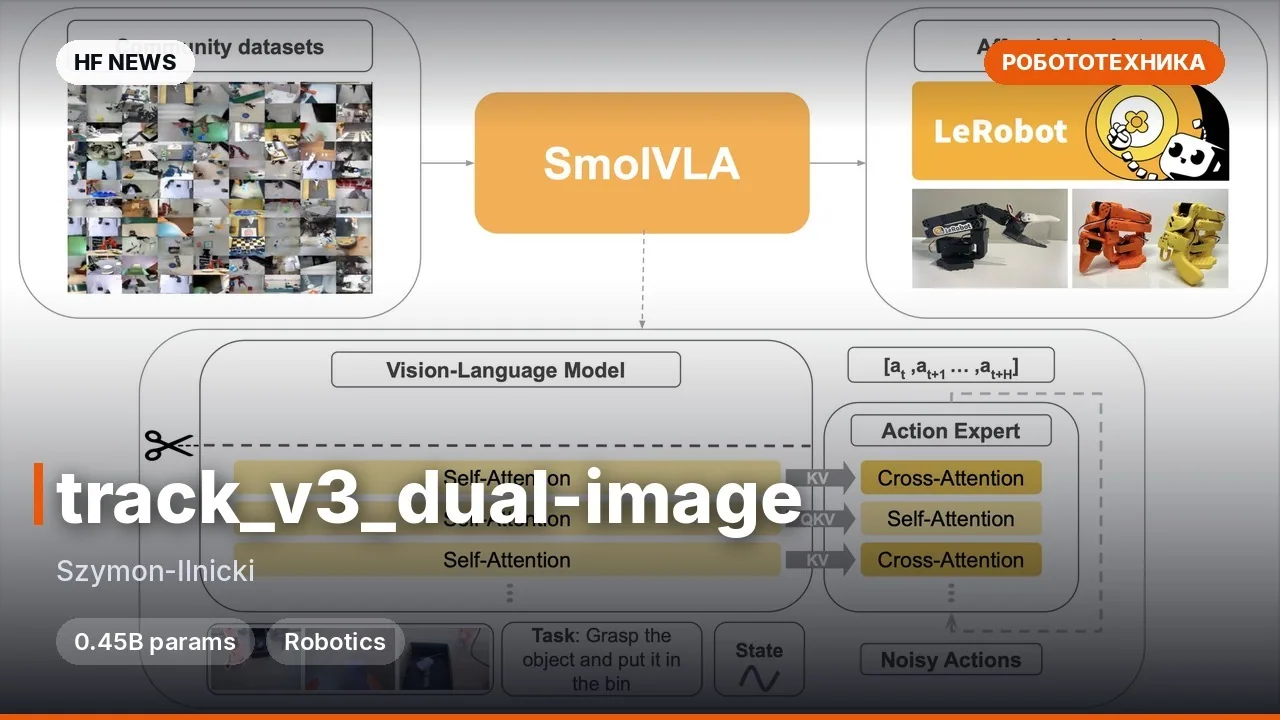
an autopilot for the F1TENTH robot car based on SmolVLA

2 min read

A control policy for the f1tenth autonomous racing platform (a scaled-down driverless race car) trained to navigate a track using text commands and images from two onboard cameras. The model is based on the compact lerobot/smolvla_base architecture with 0.45B parameters—a Vision-Language-Action (VLA) model designed to run on consumer hardware. Unlike the base checkpoint, this version was fine-tuned by user Szymon-Ilnicki on 26 driving episodes on a track without cones and understands four driving modes: fast or slow, clockwise or counter-clockwise. It is useful for developers and students building robots using the LeRobot stack and experimenting with vision-language vehicle control.

Key features

  • Accepts images from two cameras simultaneously (camera1 and camera2 at 240×424 resolution) plus a 2-dimensional robot state vector observation.state.
  • Controlled by task text prompts: distinguishes direction (clockwise / counter-clockwise) and driving pace (fast / slow).
  • The compact size of 0.45B parameters allows running inference without heavy server accelerators.
  • Compatible with the standard pipeline of the LeRobot library version 0.7.0 and distributed under the open-source Apache-2.0 license.

What you can do

  • Run autonomous laps on a real or test F1TENTH build with two OpenCV cameras using the lerobot-rollout command.
  • Use the checkpoint as a starting point for fine-tuning on your own track, different lighting, or a configuration with cones.
  • Compare the control quality of the dual-camera setup against single-camera policies based on SmolVLA.

Example

lerobot-rollout \
  --strategy.type=base \
  --robot.type=f1tenth \
  --robot.port= \
  --robot.cameras="{ camera1: {type: opencv, index_or_path: 0, width: 640, height: 480, fps: 30}, camera2: {type: opencv, index_or_path: 1, width: 640, height: 480, fps: 30}}" \
  --policy.path=Szymon-Ilnicki/track_v4_no-cones_dual-image \
  --task="complete laps anticlockwise fast" \
  --duration=60
Read moreDetails
Trained on the local/track_v4_no-cones dataset: 26 episodes, 4836 frames at 10 FPS.
Training parameters: 20,000 steps, batch size 8, AdamW optimizer (lr 0.0001), LeRobot 0.7.0.
Limitation: validation results on a real robot have not been published in the card yet.

Discuss Telegram 0

Will it run?

Runs in BF16

Fits without quantisation.

  • BF16weights 1.1 GB · ready files1.7 GB
  • FP8 / INT8recommendedweights 0.4 GB1.0 GB
  • 4-bitweights 0.2 GB0.8 GB

Tip: go 8-bit.FP8 / INT8 is within about a percent of full precision in quality, takes half the memory and runs faster on RTX 40/50 and H100. Full precision only pays off for fine-tuning.

What to get for this model

Massed ComputeOpen Massed Compute

Your own GPU: FP8 / INT8 — from RTX 2060 · BF16 — from RTX 2060

Massed Compute hourly prices, November 2026. The discounted price applies with the coupon at checkout.

Estimate: weights plus working memory. Long videos, high resolutions and long contexts need more.

Run it on Massed Compute

The script downloads the model to the rented machine. How to run it is in the model card.

  1. 1. Rent a machine with a fitting GPU

    Open Massed Compute
  2. 2. Paste the script into the machine's terminal

    Connect over SSH (the Massed Compute panel shows the command) or open a terminal on the machine's desktop.

    HF_TOKEN / CIVITAI_TOKENThe script starts with token lines: paste yours between the quotes. The Hugging Face token is for gated models, the Civitai one for Civitai models.

    # Szymon-Ilnicki/track_v4_no-cones_dual-image
    mkdir -p ~/models
    curl -LsSf https://astral.sh/uv/install.sh | sh
    source "$HOME/.local/bin/env"
    uv tool install "huggingface_hub[cli]"
    hf download Szymon-Ilnicki/track_v4_no-cones_dual-image --local-dir ~/models/track_v4_no-cones_dual-image
    # The model is in ~/models. How to run it is in the model card (link above).
  3. 3. Use it

    The model is in ~/models. How to run it is in the model card (link above).

Stop the machine in the panel when you are done: it bills by the minute while it runs.

How to speed it up

Picked for this model type. Choose your hardware above to see what fits you exactly.

  • FlashAttention 44.0.0b40from November 18, 2026new release

    fastest exact attention on B200

    Kernels for Blackwell (beta). Exact attention without quantisation — fine for everything, LLMs included.

    How to enable: pip install flash-attn-4; vLLM and SGLang pick it up themselves.

    Earlier generations (2)
    • FlashAttention 3 — The Hopper (H100/H200) version with FP8.
    • FlashAttention 2 — The standard for RTX 30/40/50 and A100: exact attention without the memory cost of long contexts.
  • torch.compile2.15.0from October 28, 2026new release

    10–30% for free

    Compiles the model for your GPU. Slower first run, faster afterwards.

    How to enable: model = torch.compile(model); in ComfyUI the TorchCompileModel node.

Model family

  1. SmolLM2-360Mfamily root
  2. SmolLM2-360M-Instruct
  3. SmolVLM-500M-Instruct
  4. SmolVLM2-500M-Video-Instruct
  5. smolvla_base
  6. track_v4_no-cones_dual-image

New posts about versions of SmolLM2-360M (quants, finetunes, LoRAs) will show up under the bell.

Quantised versions 12All on Hugging Face
Fine-tunes 12All on Hugging Face
LoRAs and adapters 8All on Hugging Face
Merges 1All on Hugging Face

About the model

Szymon-Ilnicki/track_v4_no-cones_dual-image
Author
Szymon-Ilnicki
Category
Robotics
Released
Posted

On NeyroLearn

Hugging Face

00

Ask AI about this model

Answered by Gemini 4 · the chat is kept only in this tab

Comments